

 I recently switched to an iPhone, and am sad. I’m sad i didn’t get one sooner, but also a bit sad at innocence lost. Every giant leap in technology is a little like loosing a piece of innocence and the iPhone has simply changed how much I can be connected and in touch with family, friends and business.
Once you get a quality internet enabled cellphone, you can’t go back. This is a win for ATT and other wireless carriers.
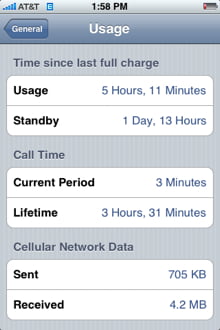
One problem with the iPhone is battery life. The phone sucks batteries like the IRS sucks on your bank account. It goes down fast.
The general solution is to turn off as many services as possible. If you ask why you should disable so many cool features, the answer is this is just a part of the process. Smartphones are still early stage products, and batteries just aren’t small enough yet.
Holding the iPhone home button for 7 seconds will tell an application to Force Quit which can dramatically save battery life by stopping programs such as Mail and Safari from running in the background. Pressing the home button will kill some apps, but some remain active in the background, unknowingly killing your battery life.
Preserve iPhone Battery Life
- Disable WiFi
- Disable 3G – will help also reduce dropped calls
- Disable data push
- Disable location services (i have a hard time with this one)
- Fetch new data no more than once an hour
Also, for some reason Apple products have historically low battery life, my power macs and macbooks get lousy uptime when not plugged in. I got a lot of the The Art of iPhone Battery Life from Guy kawasaki. I don’t have 9000 contacts like he does, but I manage contacts through the Gmail contacts and Apple Mail address book.
To take your own cool screenshots on the iPhone hold down the power and home button simultaneously.


7 Responses
It is real pleasure to use the latest iphone, thanks for providing developer app tips.
Hi I like this comment about iphone batteries and it is so fabulous that I have a chance to get more than 3 hours talk time.
Looks good, reads well – good article about iphone battery life, i never use multitasking.
Zen – push the lock button up and the iphone screen will turn off after a few seconds. Then you’ll get about 20 hours usage out of a charge.
Thanks for the info. I am thinking of getting the iPhone, and have been getting tired of the short battery life on my old Creative Zen mp3 player. It sits there with a bright screen running while I am playing music. I can’t understand why they didn’t include a feature to have the screen shut off while playing music to save battery life.
batteries could do with some improvement, your guide has helped a lot
thanks